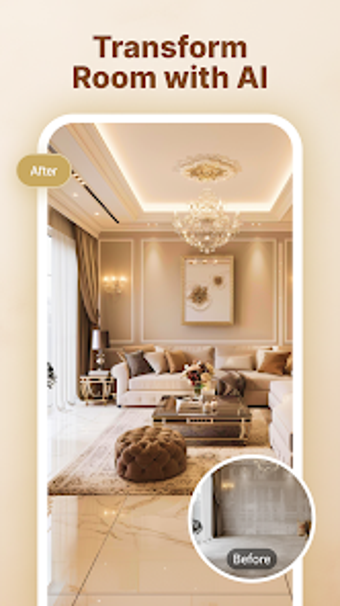
AI Room Design Makeover: Instant AI previews for interiors and gardens
AI Room Design Makeover, from Primordial Labs Inc., helps homeowners and hobbyists visualise renovation ideas using artificial intelligence. The app converts user photos into photorealistic design previews and offers landscaping inspiration, so users can compare styles quickly. It includes smart editing tools and project organization to keep multiple concepts, and supports common room types and popular design themes. The target audience is DIY renovators and design hobbyists who need fast visual exploration of interior and outdoor ideas.
What does AI Room Design Makeover actually do?
The app produces AI-powered transformations from photos, generating photorealistic previews for interior and outdoor spaces. It supports multiple room types, including living rooms, bedrooms, kitchens, and bathrooms, and supplies a selection of themes such as Modern, Minimalist, Japanese-inspired, and European elegance. Smart editing functions include an object remover and AI photo enhancement, and a project area saves and lets users compare different makeover concepts.
Does it have device requirements or compatibility limits?
The app runs on Android devices and requires Android 7.0 and up, so it installs on a broad range of phones and tablets. Photorealistic previews are presented instantly in the interface, which implies active image processing during use. The developer’s background in AI and machine learning underpins those processing features, and users should confirm their device meets the stated Android minimum before installing.
Is it safe to edit source photos and organise projects?
The tool offers in-app editing, including an object remover and AI enhancements, and a project organization area for saving and sharing concepts. The documentation notes saving and side-by-side comparison capabilities. The source material does not list an automatic backup or explicit version-rollback mechanism, so users who need archival copies should export originals before making irreversible edits.
Do non-technical users need specialist skills to operate it?
The app is engineered for quick idea exploration: users upload a photo and apply a design style with a few taps, making it accessible to homeowners and hobbyists. It functions as a visual mood board for early-stage planning and supports garden and patio inspiration as well. Hobbyists can experiment without deep technical knowledge, though careful photography improves the quality of AI-generated previews.
A practical pick for DIY planning, with a simple preparation tip
For homeowners and design hobbyists who want fast, image-based concepting, this app is a practical option. Expect results that depend on the clarity and lighting of your source photos; shoot well-lit, straight-on room images to maximise preview quality. Recommended.